Getting Mac Version Information
To get the current version of Mac you have installed, follow these steps:
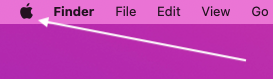
Click the Apple logo in the top left corner of the screen:
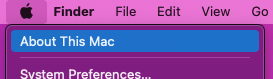
Select "About This Mac":
The version information is now available to you:

Click the Apple logo in the top left corner of the screen:
Select "About This Mac":
The version information is now available to you: